

Since Lambda first hit the scene in November 2015, it has been the standard for deploying serverless functions. Developers fell in love with Lambda because it eliminates server management and lets teams quickly build and scale systems.
As useful as Lambda is, the reality is that it changes how you build and run applications, for better or worse. The serverless execution model brings automatic scaling and pay-per-use pricing, along with constraints that don’t exist in traditional deployments, such as hosting applications on Elastic Compute Cloud (EC2).
If you haven’t built on Lambda from the inception of your project and want to begin leveraging it, you’re going to need to migrate your applications (or parts of them) over. If you’re running microservices on EC2 and considering Lambda, you’ll see lower operational overhead, better cost efficiency for variable workloads, and automatic scaling without capacity planning. But Lambda has hard limits that make some workloads a poor fit. Migrating the wrong services will increase costs and complexity instead of reducing them.
This guide covers five practical migration strategies to help teams determine what to migrate, how to handle the technical details, and when to use EC2 or containers.
1. Assess workload suitability before migration
Lambda works incredibly well for specific patterns, but assuming everything should run serverless leads to expensive mistakes due to higher runtime costs, additional operational complexity, and rework. Luckily, Lambda has been around for some time, and there is plenty of data to show what works well and what doesn’t.
What works well on Lambda
Lambda excels at event-driven, stateless workloads that complete quickly (within 15 minutes). This means that API backends, data transformations, scheduled jobs, and webhook handlers all benefit from Lambda’s automatic scaling and pay-per-invocation pricing.
Good candidates for Lambda include:
- API endpoints with unpredictable or spiky traffic patterns
- Batch processing jobs that run on a schedule or in response to events (like S3 uploads)
- Real-time stream processing from Kinesis or DynamoDB Streams
- Background tasks triggered by SQS messages or EventBridge events
- Webhook handlers for third-party integrations
What doesn’t belong on Lambda
Lambda has a maximum 15-minute execution limit. For long-running processes such as video encoding, large-scale data exports, or complex machine learning (ML) inference jobs, services like Amazon Elastic Container Service (ECS) or Fargate are needed because execution time is unlimited.
Lambda also has an ephemeral execution model, where compute environments are short-lived and not guaranteed to persist between requests, such as when new instances are created during traffic bursts. As a result, stateful applications with persistent connections (WebSockets, long polling) are a poor fit. Applications that rely on in-memory session state or require sticky sessions are also a poor fit and should run in Amazon ECS or Amazon EC2 containers.
Lastly, even when deployed on Lambda, high-frequency, steady-state workloads with consistent traffic can incur higher costs. The pay-per-invocation model works really well when traffic is variable, but for workloads with constant 24/7 load, you’re paying a premium for flexibility you’re not using. Reserved EC2 instances or ECS with reserved capacity often make more economic sense for workloads like this.
Decision framework
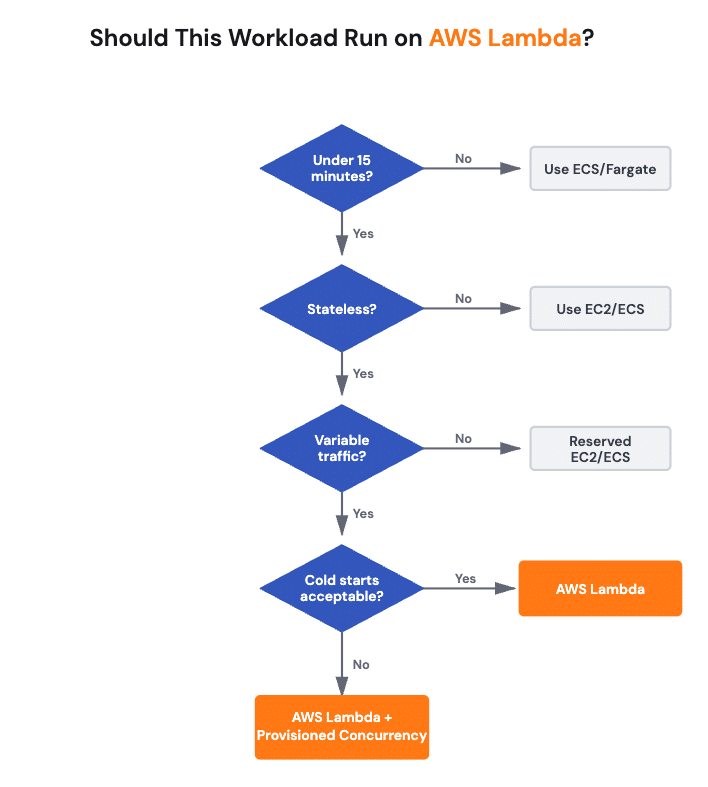
To wrap up our points above in a side-by-side fashion, before migrating a service, evaluate it against these criteria:
| Criteria | Lambda-friendly | Better elsewhere |
| Execution time | <15 minutes | >15 minutes, use ECS/Fargate |
| Traffic pattern | Variable, event-driven | Steady 24/7, use Reserved EC2/ECS |
| State requirements | Stateless | Stateful, persistent connections, use ECS |
| Cold start tolerance (see practice 3 for more details) | Tolerable for background tasks | <100ms user-facing, use Provisioned Concurrency or containers |
Additionally, if your workload has complex dependencies on shared file systems, consider refactoring to use Amazon Simple Storage Service (S3), or whether you need Lambda with Amazon Elastic File System (EFS) mounting (which adds cold-start time and complexity).
2. Migrate EC2 microservices strategically
If you’re running containerized microservices on EC2, you have options beyond Lambda. Although we may default to Lambda as the platform of choice, the best migration path depends on your application’s current packaging and architectural complexity.
For containerized microservices
If your services are already containerized, Lambda supports container images up to 10GB, which means you can migrate without completely repackaging. This works well when you have existing Docker workflows and want to leverage Lambda’s scaling and event-driven model.
Overall, getting these microservices up and running on Lambda is simple. For example, here is a (simplified) demonstration of packaging a Node.js microservice for Lambda using a container:
FROM public.ecr.aws/lambda/nodejs:18

# Copy function code
COPY app.js package*.json ./

# Install dependencies
RUN npm ci --production

# Set the handler
CMD ["app.handler"]
Then, since Lambda expects a specific handler interface, which differs from a standard container’s entry point, you’ll need to implement this. Here’s a simple example of what that might look like:
// handler.js
const { pool } = require('./db');

exports.handler = async (event) => {
 const connection = await pool.getConnection();
 try {
  const [rows] = await connection.query('SELECT * FROM users');
  return {
   statusCode: 200,
   body: JSON.stringify(rows)
  };
 } finally {
   connection.release();
 }
};
For non-containerized services
If your microservices aren’t containerized, you’ll need to package them as Lambda deployment packages (ZIP files). This works best for lightweight services with minimal dependencies.
AWS has a 50MB limit for direct uploads and a 250MB limit for deployment packages, unzipped. If you exceed this, consider using Lambda layers for shared dependencies or refactoring the service to reduce its footprint.
Handling environment variables and secrets
Lambda natively integrates with AWS Secrets Manager and Systems Manager Parameter Store for storing and managing sensitive data. Instead of baking credentials into your container or deployment package, reference them at runtime. In code, this means bringing in the correct AWS Secrets Manager SDK for your language and plugging in the values into your app. Here’s an example of what this might look like in a Node app that will be deployed on Lambda (although admittedly this isn’t the most efficient approach, it does demonstrate the concept):
const { SecretsManagerClient, GetSecretValueCommand } =
require("@aws-sdk/client-secrets-manager");

const client = new SecretsManagerClient({ region: "us-east-1" });

exports.handler = async (event) => {
 const secret = await client.send(
  new GetSecretValueCommand({ SecretId: "prod/db/credentials" })
);

 const credentials = JSON.parse(secret.SecretString);
 // Use credentials to connect to database
};
Database connection management
One of the biggest gotchas when migrating to Lambda is database connection pooling. Traditional microservices maintain persistent connection pools, whereas Lambda’s execution model creates and destroys environments frequently. This means connections are also formed and destroyed throughout that lifecycle.
Without proper connection management, you’ll quickly exhaust database connections. Amazon RDS Proxy solves this by pooling and reusing connections across Lambda invocations, thereby reducing overhead and improving performance. However, this assumes that you are using RDS Proxy.
Alternatively, if you’re not, you can initialize database connections outside your handler function so they persist across warm invocations. In the example below, you’ll see we’ve created a db.js file to create the connection pool.
// db.js
const mysql = require('mysql2/promise');

const pool = mysql.createPool({
 host: process.env.DB_HOST,
 user: process.env.DB_USER,
 password: process.env.DB_PASSWORD,
 database: process.env.DB_NAME,
 connectionLimit: 1 // keep per-env connections low; use RDS Proxy for scale
});

module.exports = { pool };
Then, in the handler.js file (where our actual application logic sits), we will utilize that connection pool, like so:
// handler.js
const { pool } = require('./db');

exports.handler = async (event) => {
 const connection = await pool.getConnection();
 try {
   const [rows] = await connection.query('SELECT * FROM users');
   return {
    statusCode: 200,
    body: JSON.stringify(rows)
   };
  } finally {
    connection.release();
  }
};
When using Lambda with relational databases, it’s important to understand how connection pooling behaves in a serverless environment. The database pool you define in your code is created once per Lambda execution environment and reused across warm invocations, but Lambda scales concurrency by creating multiple execution environments in parallel.
That means each environment may open its own database connection, so total connection usage scales with Lambda concurrency rather than remaining fixed like it would on a single EC2 instance. Limiting the pool size (for example, connectionLimit: 1) helps prevent connection storms, but for production workloads or spiky traffic patterns, Amazon RDS Proxy is the recommended solution because it centralizes and multiplexes connections across all Lambda instances, reducing load on the database while preserving scalability.
For complex monolithic applications
If you’re dealing with tightly coupled monoliths running on EC2, containerizing and migrating to Lambda isn’t always straightforward. These applications often have complex internal dependencies that aren’t obvious until you start extracting services.
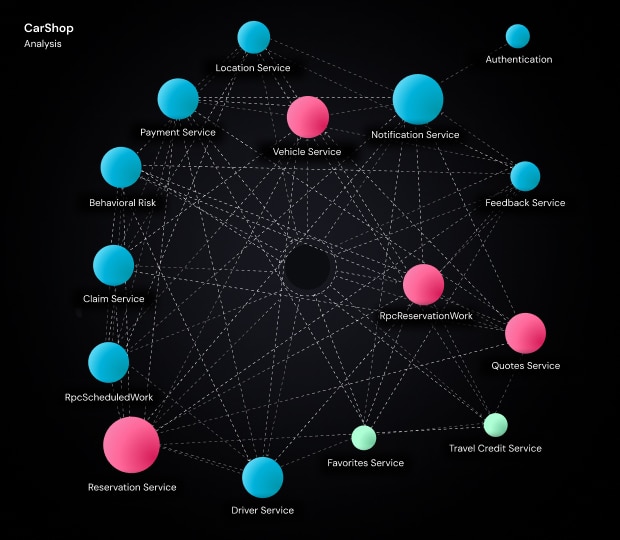
Example of a complex monolithic application vFunction analyzed to inform containerization and service extraction.
vFunction’s architectural modernization platform can help by analyzing your existing applications to identify service boundaries, map dependencies, and automate the extraction of independent domains. This accelerates what would typically take months of manual refactoring into days, with less risk of breaking critical integrations.
3. Design for cold start optimization
A common challenge with serverless functions, event-driven code that runs on demand without managed servers, is cold start. When a Lambda function hasn’t been invoked recently, AWS provisions a new execution environment, adding startup latency as the runtime initializes. While this overhead is negligible for background processing, it can impact latency-sensitive, user-facing workloads, such as request-driven APIs. The severity depends on several factors.
Understanding cold start impact
Cold start times vary by runtime and deployment package size. A lightweight Python function might initialize in 100-200ms, while a Java function with heavy frameworks can take one to two seconds. Both the deployment package size and the initialization code affect cold start duration. This makes cold starts somewhat predictable in terms of the latency added.
Provisioned concurrency for latency-sensitive endpoints
If you have user-facing APIs where consistent sub-100ms response times matter, provisioned concurrency keeps a set number of execution environments initialized and ready. The downside is that you pay for provisioned capacity whether it’s used or not, which trades cost for performance.
Provisioned concurrency makes sense for critical paths where cold start latency is unacceptable. For ultra-low-latency requirements, consider pairing it with Lambda SnapStart (for Java) or evaluating whether ECS containers might be a better fit. For less-critical endpoints, you might tolerate occasional cold starts to reduce costs.
Right-sizing memory allocation
You can also tweak Lambda’s memory settings, since they also control CPU allocation. This tactic is important because increasing memory gives you more CPU, which can reduce both cold start and execution times. Sometimes allocating more memory reduces costs because the function executes faster, and you’re billed by GB-seconds.
A function that takes 1000ms at 128MB might complete in 250ms at 512MB. The cost calculation:
- 128MB, 1000ms = 128 MB-seconds
- 512MB, 250ms = 128 MB-seconds (same cost, but 4x faster execution)
There is a limit to this approach, and some functions may not benefit at all. The best way to figure this out is to profile your function across different memory settings, which can reveal whether these optimizations actually lead to faster execution and help offset cold starts. You can use tools such as the open-source AWS Lambda Power Tuning tool to benchmark memory configurations and identify optimal settings for your workloads.
Minimize deployment package size
Smaller packages mean lower startup latency. This results in faster cold starts. To minimize deployment size, remove unused dependencies, use Lambda layers for shared libraries, and consider bundlers like esbuild or webpack to reduce package size. Anything that reduces the number of resources that need to be loaded.
Lazy loading dependencies
For the remaining dependencies, instead of importing everything at the module level, load them only when needed. This tactic is known as lazy loading (a common practice in web applications to speed up page load speed). Not every language supports this, but some do, including Python (a common language used in Lambda). Here is a high-level example of what that might look like in practice:
# Instead of this (loads on every cold start)
import boto3
import pandas as pd
import heavy_ml_library

def handler(event, context):
  # Use libraries

# Do this (loads only when code path executes)
def handler(event, context):
  if event['action'] == 'process_data':
     import pandas as pd
     # Use pandas
  elif event['action'] == 'ml_inference':
     import heavy_ml_library
     # Use ML library
As you can see, only specific execution paths load dependencies, which means that execution paths not dependent on these dependencies execute faster, since unused and unloaded dependencies don’t create latency by loading even when they are not needed.
Language runtime considerations
Just like non-Lambda-based applications, specific languages are faster than others. For instance, compiled languages (Go, Rust) generally have faster cold starts than interpreted languages (Python, Node.js) or JVM-based runtimes (Java, .NET).
If cold start performance is critical and you have flexibility in language choice, you may rewrite your logic in a new language that can reduce cold start times, increase performance, but still deliver the underlying functionality that you need. This isn’t always possible, but the modular nature of Lambda makes it easier to pick and choose which components can be rewritten in a new language, compared with replatforming an entire monolithic application.
Without clear architectural insight, teams often end up rewriting the wrong components or over-engineering migrations that don’t deliver meaningful gains. Architectural analysis with tools like vFunction helps teams focus modernization efforts where Lambda and language changes actually pay off.
4. Architect with Lambda’s strengths and limitations
Lambda works well for specific use cases, but treating it as a universal default creates problems. Not every application or microservice should be instantly deployed to Lambda. Understanding when to use Lambda and when to choose EC2 or containers prevents costly architectural mistakes that can come back to bite you later.
When to keep services on EC2 or containers
Some workloads simply don’t fit Lambda’s constraints:
- WebSocket connections require a persistent connection, which Lambda doesn’t support natively. Use API Gateway WebSocket APIs with ECS or Fargate backends instead.
- Complex state management, such as in-memory caching or session affinity, works better in containers with sticky sessions.
- GPU workloads for ML inference or graphics processing need EC2 instances with GPU support.
- High-throughput, low-latency services with consistent traffic might be more cost-effective on reserved capacity.
Integration patterns that work well
Lambda excels when combined with other AWS services:
- API Gateway for RESTful APIs and HTTP endpoints
- EventBridge for decoupled event-driven architectures
- SQS for asynchronous task queues with automatic retry and dead-letter handling
- Step Functions for orchestrating multi-step workflows across Lambda and other services
- DynamoDB Streams for real-time data processing
Avoiding distributed monoliths
One common anti-pattern is creating a “distributed monolith” by migrating a monolithic application to Lambda without refactoring. You end up with functions that are tightly coupled, share data stores in complex ways, and can’t be deployed independently.
Before migrating, identify natural service boundaries. If you’re breaking a monolith into microservices and then deploying those to Lambda, you need a clear domain model with well-defined interfaces. vFunction can help with this analysis, automatically identifying service boundaries and mapping dependencies so you avoid inadvertently creating architectural debt in your serverless environment.
5. Optimize for cost without sacrificing performance
Lambda’s pricing model is fundamentally different from EC2. You pay for requests and compute time (GB-seconds), with no charges when your code isn’t running. This shifts how you should think about optimization.
Understanding Lambda pricing
Lambda charges based on:
- Number of requests: $0.20 per 1 million requests
- Compute time: Measured in GB-seconds, based on memory allocated and execution duration
A function configured with 1GB of memory running for 200ms costs:
- 1GB × 0.2 seconds = 0.2 GB-seconds
- At $0.0000166667 per GB-second = $0.0000033 per invocation
For 1 million invocations:
- Request charges: $0.20
- Compute charges: $3.30
- Total: $3.50
Compare this to an always-on EC2 t3.medium instance ($30/month) handling the same workload. If your function is invoked sporadically or has highly variable traffic, Lambda’s model saves significantly.
ARM (Graviton2) vs. x86
Lambda supports ARM-based Graviton2 processors (and now Graviton3 processors), which often deliver around 20% better price-performance compared to x86. For workloads that don’t require specific x86 dependencies, switching to ARM is straightforward and can immediately reduce costs. If you’re using the AWS CLI, you can do so by running a command like this (specifying the architecture type with the –architecture flag):
aws lambda update-function-configuration \
 --function-name my-function \
 --architectures arm64
Memory as a cost lever
As we already covered, higher memory allocation means more CPU and potentially faster execution. Finding the sweet spot where execution time decreases enough to offset the higher per-second cost is crucial.
Use the AWS Lambda Power Tuning tool to automatically test different memory configurations and identify the optimal setting for your workload.
When higher memory equals lower costs
Let’s imagine we have a data processing function that fetches data from S3, transforms it, and writes results to DynamoDB:
- At 512MB: Execution time = 3.2 seconds
- Cost per invocation = 512MB × 3.2s ≈ 1,638 MB-seconds = $0.0000273
- At 2048MB: Execution time = 0.9 seconds
- Cost per invocation = 2048MB × 0.9s ≈ 1,843 MB-seconds = $0.0000307
In this case, 4x memory only increased the cost by 12%, but reduced execution time by 72%. For user-facing endpoints, the performance gain is worth the marginal cost increase. For cost-sensitive batch jobs, the 512MB configuration might still be fine.
Comparing Lambda to always-on alternatives
Lambda makes sense when utilization is low or traffic is unpredictable. For steady-state workloads with consistent traffic, reserved EC2 instances or ECS with reserved capacity might be more economical.
General guidelines:
- Variable or spiky traffic → Lambda usually wins
- Steady 24/7 traffic at scale → Reserved EC2/ECS often cheaper
- Batch processing on a schedule → Lambda is ideal
For organizations looking to move beyond EC2 entirely, vFunction provides tools to assess workload characteristics and determine which AWS-native services deliver the best cost and performance outcomes for each application domain.
Accelerating Lambda migration with vFunction
One of the biggest challenges in migrating to Lambda isn’t the technical mechanics of deploying functions; that part is generally simple. The challenge is understanding what to extract from existing applications and how those pieces connect. Most monolithic applications weren’t designed with clear service boundaries, and manually mapping dependencies across thousands of classes takes months.
vFunction’s architectural modernization platform analyzes Java and .NET applications to identify natural service boundaries within your existing codebase. The platform collects static and dynamic data from your running applications, capturing actual runtime flows, call patterns, and resource dependencies. This reveals not just how code is organized but also how it behaves in production.
Once vFunction identifies candidate domains, it generates architecture-aware refactoring guidance that integrates with tools such as Amazon Kiro and Amazon Q Developer, as well as non-AWS agentic tools such as GitHub Copilot. This workflow turns long-running, resource-intensive tasks into quick, automated, and accurate processes.
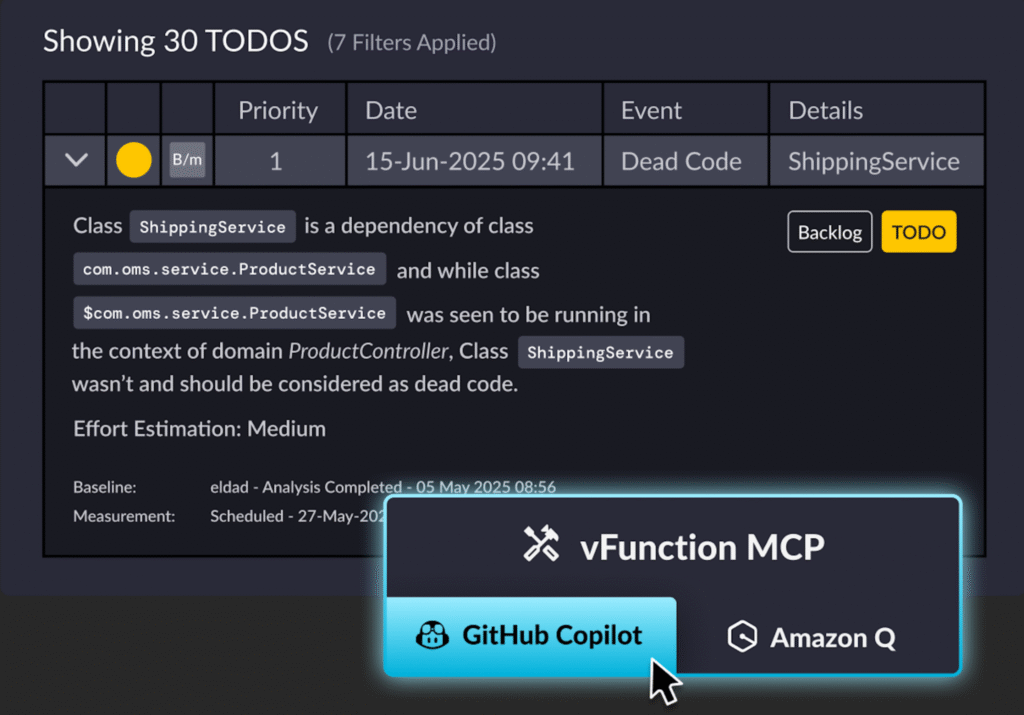
Caption: vFunction modularizes complex applications into cloud-native systems with runtime architectural context for code assistants.
In the same way that vFunction assists with monolith to microservice migrations, for Lambda migrations specifically, this helps you:
- Avoid extracting the wrong boundaries, preventing tight coupling between Lambda functions or distributed monoliths
- Identify database connection patterns early, so you know which services need RDS Proxy before migration
- Reduce deployment package size by identifying dead code, improving cold start times
- Understand dependency chains, helping you plan which services can migrate independently
For qualified AWS accounts, vFunction licenses are fully funded through the AWS ISV Tooling Program. If you’re dealing with complex applications where service boundaries aren’t obvious, vFunction can accelerate your path to Lambda while reducing the risk of architectural mistakes.
Conclusion
Lambda is an excellent architectural choice for services that fit into the serverless paradigm. Migrating from data centers or EC2 to Lambda requires a shift in how you architect, deploy, and operate applications. Success requires matching the right workloads to Lambda’s strengths while recognizing where other services make more sense.
Before committing to Lambda, it’s key to assess workload suitability. Not everything belongs there. Plan your migration with an understanding of how packaging, dependencies, and database connections behave in a serverless environment. Optimize for cold starts when latency matters, but don’t over-optimize for scenarios that don’t. Choose the right service for each workload. Although Lambda is powerful, ECS, Fargate, and EC2 each have their place. Focus on cost efficiency by right-sizing memory, considering ARM, and understanding when Lambda’s pricing model makes sense.
For teams running complex, monolithic applications, architectural modernization is essential to fully leveraging Lambda’s benefits. vFunction can accelerate modernization by automating the analysis and refactoring that would otherwise take months. AWS’s Migration Acceleration Program and ISV Tooling Program can also offset costs and provide expert guidance throughout the migration.
Want to learn more about how vFunction can help expedite your move to Lambda and other AWS services? Contact our team today.